

Filtering
Learn how to use our JSON:API filtering syntax.
Filter syntax
Our JSON:API general filtering syntax and its supported operations can be used across our new APIs. Please note that support for given operators and fields is highly specific to each endpoint. You can refer to the filter query parameter in the API reference documentation for which operators are supported for each field.
The filtering syntax for Klaviyo’s new APIs uses the ?filter query parameter for all endpoints that support filter operations. The following filter syntax can be used for more complex filtering operations across all endpoints:
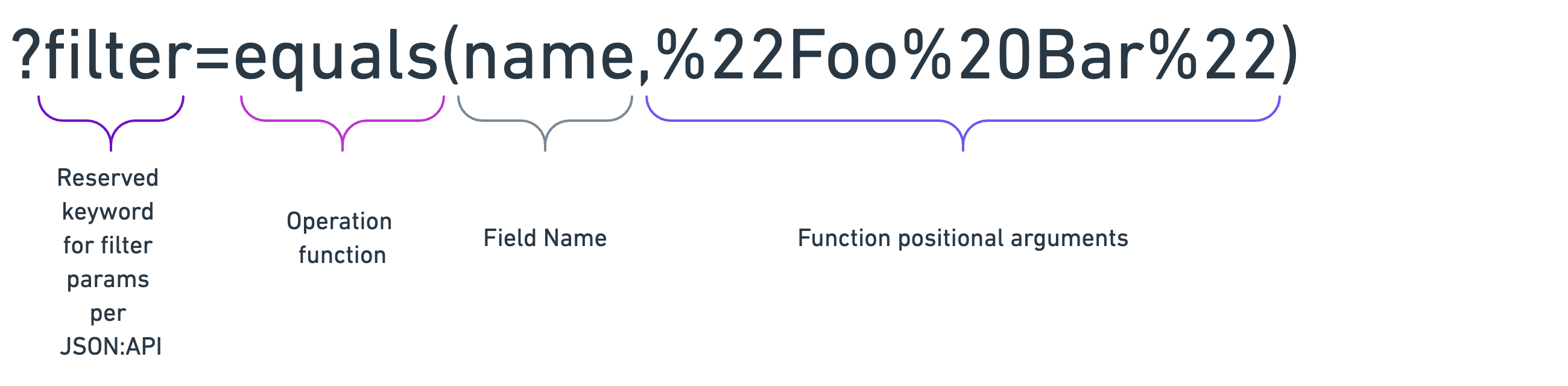
URI encoding
Filter expressions can contain non-URL-safe characters. We recommend that you always URI-encode the value of the filter query parameter to ensure your filter expression functions properly. See the MDN docs on encodeURIComponent for more details.
Filter operations
Filter operators
Below are the filter operators supported by our filter syntax. The documentation for each endpoint will indicate on the filter field which fields are enabled for filtering and which filter operators they support.
| Operator | Description | Supported field types | Raw example | Encoded example |
|---|---|---|---|---|
equals |
Return all resources where specified field equals provided value | string, boolean, number, datetime, array | ?filter=equals(email,"sarah.mason@klaviyo-demo.com") |
?filter=equals(email%2C%22sarah.mason%40klaviyo-demo.com%22) |
less-than |
Return all resources where the specified field is less than the provided value. | number, datetime | ?filter=less-than(datetime,2023-03-01T00:00:00Z) |
?filter=less-than(datetime%2C2023-03-01T00%3A00%3A00Z) |
less-or-equal |
Return all resources where the specified field is less than or equal to the provided value. | number, datetime | ?filter=less-or-equal(datetime,2023-03-01T00:00:00Z) |
?filter=less-or-equal(datetime%2C2023-03-01T00%3A00%3A00Z) |
greater-than |
Return all resources where the specified field is greater than the provided value. | number, datetime | ?filter=greater-than(datetime,2023-03-01T01:00:00Z) |
?filter=greater-than(datetime%2C2023-03-01T00%3A00%3A00Z) |
greater-or-equal |
Return all resources where the specified field is greater than or equal to the provided value. | number, datetime | ?filter=greater-or-equal(datetime,2023-03-01T00:00:00Z) |
?filter=greater-or-equal(datetime%2C2023-03-01T00%3A00%3A00Z) |
contains |
Return all resources where the specified field "contains" the provided value, i.e. it is contained within a portion of a string or it is equal to an item within an array. | string, array | ?filter=contains(name,"marketing") |
?filter=contains(name%2C%22marketing%22) |
contains-any |
Return all resources where the specified field contains any of the items in the provided array value. | string, array | ?filter=contains-any(description,["sms","email"]) |
?filter=contains-any(description%2C%5B%22sms%22%2C%22email%22%5D) |
contains-all |
Return all resources where the specified field contains all of the items in the provided array value. | string, array | ?filter=contains-all(description,["sms","email"]) |
?filter=contains-all(description%2C%5B%22sms%22%2C%22email%22%5D) |
ends-with |
Return all resources where the specified field ends with the provided value. | string | ?filter=ends-with(description,"End") |
?filter=ends-with(description%2C%22End%22) |
starts-with |
Return all resources where the specified field starts with the provided value. | string | ?filter=starts-with(description,"Start") |
?filter=starts-with(description%2C%22Start%22) |
any |
Return all resources where the specified field is equal to any of the items in the provided array value. | string, number, datetime, boolean | ?filter=any(email,["sarah.mason@klaviyo-demo.com","matt-kemp@klaviyo-demo.com","lindsey.smith@klaviyo-demo.com"]) |
?filter=any(email%2C%5B%22sarah.mason%40klaviyo-demo.com%22%2C%22matt-kemp%40klaviyo-demo.com%22%2C%22lindsey.smith%40klaviyo-demo.com%22%5D) |
has |
Return all resources that have the specified resource. | object | ?filter=has(profile) |
?filter=has%28profile%29&page%5Bcursor%5D=WzE3MDc1MjMyMTMsICI0WFVjeHIyV0pVUiIsIHRydWVd |
Boolean logic operators
| Operator | Description | Raw example | Encoded example |
|---|---|---|---|
and |
This operator accepts other operator functions as arguments to perform a logical AND operation. |
?filter=and(equals(first_name,"Jane"),equals(email,"jane@klaviyo-demo.com")) |
?filter=and(equals(first_name%2C%22Jane%22)%2Cequals(email%2C%22jane%40klaviyo-demo.com%22)) |
, |
This can be used to perform an implicit AND operation. |
?filter=equals(first_name,"Jane"),equals(email,"jane@klaviyo-demo.com") |
?filter=equals(first_name%2C%22Jane%22)%2Cequals(email%2C%22jane%40klaviyo-demo.com%22) |
Comparison literals
string: Arguments representing string literals are expressed with quotation marks (we will accept either single quoted or double-quoted strings). Single or double-quoted characters within strings (quoted with like quote characters) MUST be escaped with a single backslash (i.e. ‘Tony\’s ball’)
Comparisons to all string literals are case-sensitive, unless otherwise noted in endpoint specific documentationboolean: Booleans are expressed as unquoted true and false literal valuesnumber: Numbers are expressed as standard integer or float representationsdatetime: Datetimes are expressed as unquoted ISO-8601 RFC-3339 formatted strings. For example,2012-04-21T11:30:00-04:00array: Array literals are expressed using square brackets ([ ])null:nullis a reserved literal to represent null values for fields of any type