

You're reading the reference for API revision 2025-01-15. The latest revision is 2026-10-15. See this page in the latest revision.
Klaviyo API Reference
Every endpoint in the Klaviyo REST API, with its authentication, parameters, request and response bodies, and an example request. This reference covers API revision 2025-01-15.
Quickstart
- New Klaviyo developers: Check out our Get started with Klaviyo series to set up an account, obtain API credentials, and authenticate.
- Current Klaviyo developers:
- Install one of our new SDKs.
- Make test calls with the new API collection in our Postman workspace.
- To learn more, see below for an overview of the newly launched API features:
- Go into detail on the JSON API features supported by our new API surface.
OpenAPI and Postman
View the latest OpenAPI spec here. Import the spec into your favorite API tool, such as Postman, to start interacting with our new APIs right away.
You can also navigate to our Postman Workspace, where you will find our latest collection of requests, along with the API definitions. You can get started by checking out our Postman collection guide.
Authentication
Klaviyo provides 3 methods of authentication including private key authentication and OAuth (used to call server-side APIs) and public key authentication (used to call client-side APIs). Read below for a quick overview of each method.
Private key authentication
All /api endpoints use private API keys with API key scopes to authenticate requests. If you do not use an API key for your requests, or if you use a key from the wrong account, your call will return an error. A 401 error indicates an invalid or missing API key.
Private key authentication for /api endpoints is performed by setting the following request header:
Authorization: Klaviyo-API-Key your-private-api-keyOAuth
If you are a tech partner integrating with Klaviyo, we recommend using OAuth to authenticate your app. OAuth offers multiple benefits over a private key integration, including security, usability, and improved rate limits. Check out our guide on setting up OAuth.
Public key authentication
All /client endpoints are designed to only be called from publicly-browseable client-side environments and use public API keys to authorize and route requests. Your public API key is your 6-character company ID, also known as a site ID. We recommend using the Klaviyo object or our mobile SDKs for interacting with our client-side APIs.
Public API keys are passed to /client endpoints using a query parameter:
curl --request POST \
  --url 'https://a.klaviyo.com/client/events/?company_id=COMPANY_ID'
  --header 'Content-Type: application/json'
  --data '{DATA}'
API key scopes
Klaviyo's APIs support the use of API scopes, which allow you to restrict access for third parties using a private API key. Adding a scope helps you protect your and your customers’ data by limiting what third parties can access.
You can add any of the following scopes to any new private API key in Klaviyo:
- Read-only Only allows third parties to view all data associated with the endpoint
- Full Allows third parties to create, delete, or make changes to anything associated with that endpoint (set by default)
- Custom Allows you to decide how much access to give the third party
Note that you cannot add a scope to an existing private key. You also cannot edit a private API key after it’s been created. If you need to remove access to a key based on its current scope, delete it and then create a new key with the correct scope.
For more information about the supported scopes for each endpoint and how to add a scope to an API key, please refer to the Authenticate API requests guide.
Versioning and deprecation
Check out our API versioning and deprecation policy to learn about how Klaviyo handles API versioning and support.
Status codes and errors
Every response will include an HTTP status code with more details on whether the request succeeded. Check out our guide on status codes and errors to learn more about status codes used by Klaviyo’s APIs and how to troubleshoot error responses.
Rate limiting
All new API endpoints are rate limited on a per-account basis, and use a fixed-window rate limiting algorithm with two distinct windows: burst (short) and steady (long). All API traffic will be subject to rate limits, and will receive HTTP 429 errors in the event either a burst or steady rate limit is reached.
Each endpoint lists its burst and steady rate limits in our API reference documentation.
JSON:API feature guides
Relationships
Klaviyo’s modern APIs offer powerful functionality via the relationships object, a thorough set of syntax offered by JSON:API for modeling relationships between resources. This syntax allows developers to efficiently query specific groups of related resources, eliminating the need to perform redundant queries.
Check out our guide on JSON:API relationships for more information on how use, create, modify, and delete resource relationships.
Filtering
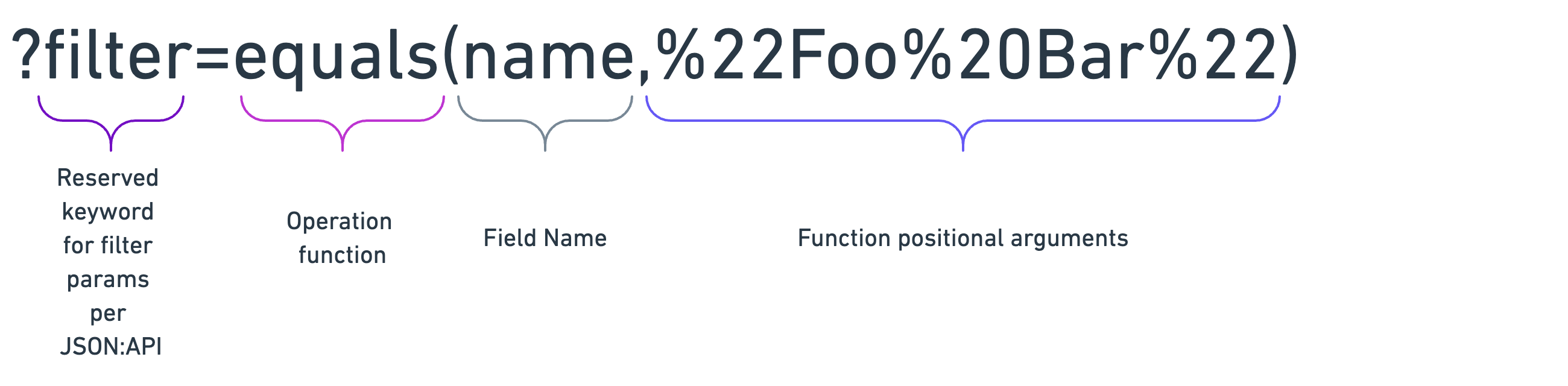
JSON:API’s general filtering syntax and its supported operations can be used across all new APIs. Please note that support for specific operators and fields is highly specific to each endpoint. You can refer to the filter query parameter in the API reference documentation for specific operator and field support.
View our JSON:API filtering guide for a list of the filter operations and comparison literals.
The filtering syntax for Klaviyo’s new APIs uses the ?filter query parameter for all endpoints that support filter operations.
Sorting
Where supported, sorting is handled using the ?sort query parameter followed by a field name. Reverse sorting is specified using a - prefix.
Example
GET /api/events/?sort=datetime sorts events by datetime ascending; GET /api/events/?sort=-datetime sorts by datetime descending.
For more examples, view our JSON:API sorting guide.
Sparse fieldsets
Several endpoints support sparse fieldsets to allow developers to select only requested fields of resources, rather than having to retrieve entire resources (which may be very large).
Sparse fieldsets are specified using the ?fields[TYPE]=field1,field2 query parameter, where TYPE is the resource type from which to select only field1 and field2. This also works for included resource types, e.g. ?fields[INCLUDED-TYPE]=field1,field2; however you also need to include that resource in your request, using the include query parameter for this to work.
Examples:
GET /api/events?fields[event]=metric_id,profile_idwill retrieve only themetric_idandprofile_idattributes for all events returned in the response.GET /api/events?fields[profile]=first_name,email&include=profilewill retrieve alleventfields and only thefirst_nameandemailattributes for includedprofileresource data.
To learn more about sparse fieldsets, see our JSON:API sparse fieldsets guide.
Pagination
Our APIs support cursor-based pagination with the query parameter ?page[cursor].
Paginated resource responses will contain a specific set of pagination cursor helper links in their top-level links object, like the following:
{
  "data": [
    ...
  ],
  "links" : {
    "next" : "https://a.klaviyo.com/api/profiles/?page%5Bcursor%5D=bmV4dDo6aWQ6Ok43dW1iVw",
    "prev" : null,
    "self" : "https://a.klaviyo.com/api/profiles"
  }
}
Use these links to navigate to next and previous pages.
Datetimes
Datetime formatting
All datetimes across all new APIs in URLs, request, and response bodies must be formatted as ISO 8601 RFC 3339 datetime strings.
Example:
2023-01-16T23:20:50.52Z
Beta APIs
These endpoints are in beta at revision 2025-01-15. To call them, send the revision header 2025-01-15.pre. They may change before they're generally available.
Browse by resource
- Accounts2 endpoints
- Campaigns26 endpoints
- Catalogs55 endpoints
- Coupons17 endpoints
- Data Privacy1 endpoint
- Events8 endpoints
- Flows19 endpoints
- Forms7 endpoints
- Images5 endpoints
- Lists13 endpoints
- Metrics10 endpoints
- Profiles26 endpoints
- Push Tokens1 endpoint
- Reporting7 endpoints
- Reviews3 endpoints
- Segments11 endpoints
- Tags26 endpoints
- Templates12 endpoints
- Tracking Settings3 endpoints
- Webhooks7 endpoints
- Client7 endpoints