

You're reading the reference for API revision 2025-10-15. The latest revision is 2026-10-15. See this page in the latest revision.
Before you begin
Check out our general API overview before getting started with specific endpoints.
Our Events API allows you to retrieve and create events, which are actions taken by Klaviyo profiles. Each event has exactly one metric (effectively the “event type”) associated with it and a timestamp for when it occurred. The metric and profile associated with an event are stored in the event’s relationships object. There are two types of endpoints within the Events API:
- Events endpoints for fetching or creating event data.
- Relationships endpoints for accessing a list of related metrics or profiles for a specific event.
Use cases
The Events API supports the following use cases:
- Creating custom events that can be used to trigger flows (e.g., a Reset Password event that triggers an email with a reset password URL).
- Getting Klaviyo events that can be used for data analysis (e.g., retrieving engagement events tracked by native Klaviyo metrics, such as Opened Email and Clicked SMS).
- Getting a specific profile’s events to power an activity feed.
- Getting related profile and/or metric data for a given event.
You can find example code for all of these use cases in our api-examples repo.
Data model
An event can have the following:
properties(required)The properties of the event (see Event properties). Non-object properties can be used for creating segments. The
$extraproperty records any non-segmentable values, e.g., HTML templates, that can be referenced later.timeThe timestamp of when the event occurred. By default, the value is the time the event was created. You should provide
timewhen creating a historical event for a profile.valueThe numeric value to associate with the event, e.g., a price. Defaults to 0 if events logged under the provided metric have historically contained a
valuefield.unique_idA client-supplied unique identifier for an event. Used for idempotency: if you POST the same event twice with the same
unique_id(same profile, same metric), only the first processed event is recorded — the duplicate is discarded. This makes the Create Event endpoints safe to retry. We recommend generating a UUID v4 per event (e.g., via theuuidnpm package or the built-incrypto.randomUUID()) and sending the same value on retry.backfillOptional boolean, defaults to
false. Whentrue, indicates the event is part of a historical / backfill sync. The event is still recorded and is visible in metrics, segmentation, and the events API, but it does not trigger flows. Use this when replaying events that have already fired in the past (e.g., a full sync from an external CRM) so existing flow definitions do not re-fire on those historical events and send duplicate messages. Available on bothCreate EventandBulk Create Events— on bulk, setbackfill: trueat the top level of eachevent-bulk-createentry to apply it to every event in that entry.relationshipsmetricThe metric associated with the event.
profileThe profile associated with the event.
Events and metrics
Each event object is related to a metric object, per the data model above. A metric is what defines an event’s type. Think of a metric as a recipe name and its defined events as the instances in which the recipe was cooked. Each event includes the recipe name (metric), the chef (profile), the time the recipe was cooked, and details like ingredients (properties) and, optionally, value. When you create a custom event object via API, you’ll need to provide a metric name associated with the event, for example, Viewed Product. If the metric you provide does not match an existing one, a new metric will be created with its own metric_id. The metric_id connects the metric to an event. This ID, along with other fields like profile_id, can be used to query events.
Event properties
Each event includes a properties object, which stores relevant details about the event being tracked. Some use cases of these properties include:
Segmentation
Non-object property values can be used to build segments, e.g., a segment with customers who have purchased products within the "Skincare" category. See our FAQ for more information on how to structure event data for segmentation.
Flows
Use data stored in event properties to personalize flows, e.g., build show/hide conditions in an abandoned cart flow based on a cart's value or items added.
Reporting
Understand trends in reports by key event properties, e.g., create a report that gives performance data on revenue for Placed Order events for a specific product.
You may have up to 400 event properties per event. See Limitations for information.
Excluded property values
When setting event property values, it's important to know how Klaviyo handles certain inputs. The following values are ignored when used to update event properties:
0(number data type)nullorNone""(empty string)
If you assign these values to event properties, Klaviyo treats them as if they were never set, i.e., the properties are excluded and cannot be used for segmentation.
Note that the way Klaviyo handles event properties differs from how it handles profile properties. You may create and segment of off profile properties with a value of 0.
Create Event
To create an event, you’ll need at least one profile identifier (e.g., id, email, or phone_number) and a metric name.
Your request payload for Create Event should be formatted like the example Reset Password event below:
{
    "data": {
        "type": "event",
        "attributes": {
            "properties": {
                "action": "Reset Password",
                "PasswordResetLink": "https://www.website.com/reset/1234567890987654321"
            },
            "metric": {
                "data": {
                    "type": "metric",
                    "attributes": {
                        "name": "Reset Password"
                    }
                }
            },
            "profile": {
                "data": {
                    "type": "profile",
                    "attributes": {
                        "email": "sarah.mason@klaviyo-demo.com"
                    }
                }
            },
            "unique_id": "4b5d3f33-2e21-4c1c-b392-2dae2a74a2ed"
        }
    }
}
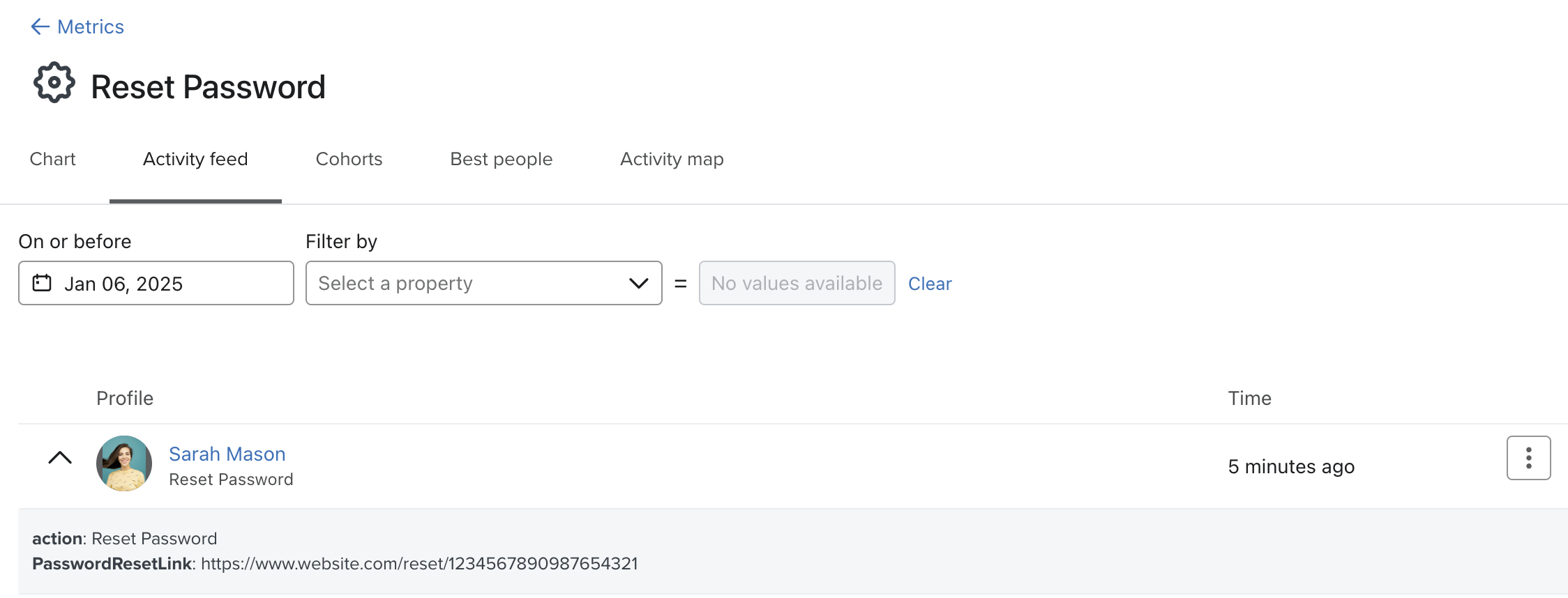
In the example Create Event payload, an email, sarah.mason@klaviyo-demo.com, and a metric name, Reset Password, are provided to associate the created event with a profile and a metric. The only optional field provided is the unique_id in UUID format for good practice. Once the event has been created, you should see the event logged in the profile’s activity feed in Klaviyo:
Using optional fields like time and value in events
Use optional fields like time (for historical events) and/or value (e.g., price) to enrich your event data. Ordered Product events are useful for creating flows based on product-specific information. They can also help with creating more personalized recommendations for your customers. In the example below, an Ordered Product event is created with the value field representing the product’s price:
{
  "data": {
    "type": "event",
    "attributes": {
      "properties": {
        "OrderId": "cc50e5b3-059c-4f7d-9e26-821302b63235",
        "ProductID": "1111",
        "SKU": "WINNIEPOOH",
        "ProductName": "Winnie the Pooh",
        "Quantity": 1,
        "ProductURL": "http://www.example.com/path/to/product",
        "value": 9.99,
        "metric": {
            "data": {
            "type": "metric",
            "attributes": {
                "name": "Ordered Product"
            }
        }
      },
      "profile": {
        "data": {
          "type": "profile",
          "id": "01H7FZEVECGN0MNQ8V417TPVP0",
          "attributes": {
            "email": "sarah.mason@klaviyo-demo.com",
            "phone_number": "+15005550006",
            ...
        }
      },
      "unique_id": "cc50e5b3-059c-4f7d-9e26-821302b63235"
   }
}Bulk Create Events
The Bulk Create Events API supports creating multiple events for one or more profiles at a time.
A maximum of 1,000 events can be created in a single request, and the max allowed payload size is 5MB.
Bulk create events for a single profile
The example below is a request to Bulk Create Events to create 2 events (Refunded Order and Placed Order) for a single profile:
{
    "data": {
        "type": "event-bulk-create-job",
        "attributes": {
            "events-bulk-create": {
                "data": [
                    {
                        "type": "event-bulk-create",
                        "attributes": {
                            "profile": {
                                "data": {
                                    "type": "profile",
                                    "attributes": {
                                        "email": "bill.joel@klaviyo-demo.com",
                                    }
                                }
                            },
                            "events": {
                                "data": [
                                    {
                                        "type": "event",
                                        "attributes": {
                                            "properties": {
                                                "Reason": "No longer needed.",
                                                "Brand": "Kids Book",
                                                "Categories": [
                                                    "Fiction",
                                                    "Children"
                                                ]
                                            },
                                            "time": "2024-05-10T00:00:00+00:00",
                                            "value": 9.99,
                                            "value_currency": "USD",
                                            "unique_id": "3e57326a-f0b8-4d4f-98e5-aa56a39842d9",
                                            "metric": {
                                                "data": {
                                                    "type": "metric",
                                                    "attributes": {
                                                        "name": "Refunded Order"
                                                    }
                                                }
                                            }
                                        }
                                    },
                                    {
                                        "type": "event",
                                        "attributes": {
                                            "properties": {
                                                "Brand": "Kids Book",
                                                "Categories": [
                                                    "Fiction",
                                                    "Children"
                                                ]
                                            },
                                            "time": "2024-05-11T00:00:00+00:00",
                                            "value": 9.99,
                                            "value_currency": "USD",
                                            "unique_id": "bd29b5e8-076f-405c-b34c-591794e196e6",
                                            "metric": {
                                                "data": {
                                                    "type": "metric",
                                                    "attributes": {
                                                        "name": "Placed Order"
                                                    }
                                                }
                                            }
                                        }
                                    }
                                ]
                            }
                        }
                    }
                ]
            }
        }
    }
}Bulk create events for multiple profiles
You can use Bulk Create Events for creating events for multiple profiles at a time. The request payload in the example below creates events for 2 different profiles:
{
    "data": {
        "type": "event-bulk-create-job",
        "attributes": {
            "events-bulk-create": {
                "data": [
                    {
                        "type": "event-bulk-create",
                        "attributes": {
                            "profile": {
                                "data": {
                                    "type": "profile",
                                    "attributes": {
                                        "email": "bill.joel@klaviyo-demo.com"
                                    }
                                }
                            },
                            "events": {
                                "data": [
                                    {
                                        "type": "event",
                                        "attributes": {
                                            "properties": {
                                                "Brand": "Kids Book",
                                                "Categories": [
                                                    "Fiction",
                                                    "Children"
                                                ]
                                            },
                                            "time": "2023-05-08T00:00:00+00:00",
                                            "value": 9.99,
                                            "value_currency": "USD",
                                            "unique_id": "baf5fcf1-8e41-4868-a9b0-3a3c63c805e8",
                                            "metric": {
                                                "data": {
                                                    "type": "metric",
                                                    "attributes": {
                                                        "name": "Placed Order"
                                                    }
                                                }
                                            }
                                        }
                                    }
                                ]
                            }
                        }
                    },
                    {
                        "type": "event-bulk-create",
                        "attributes": {
                            "profile": {
                                "data": {
                                    "type": "profile",
                                    "attributes": {
                                        "phone_number": "+13105555555"
                                    }
                                }
                            },
                            "events": {
                                "data": [
                                    {
                                        "type": "event",
                                        "attributes": {
                                            "properties": {
                                                "Brand": "Kids Book",
                                                "Categories": [
                                                    "Fiction",
                                                    "Children"
                                                ]
                                            },
                                            "time": "2023-05-09T00:00:00+00:00",
                                            "value": 9.99,
                                            "value_currency": "USD",
                                            "unique_id": "fc2ac97b-24dc-4c2c-8e8e-232834dd69a8",
                                            "metric": {
                                                "data": {
                                                    "type": "metric",
                                                    "attributes": {
                                                        "name": "Viewed Product"
                                                    }
                                                }
                                            }
                                        }
                                    }
                                ]
                            }
                        }
                    }
                ]
            }
        }
    }
}
Event deduplication behavior
Both the Create Event and Bulk Create Events endpoints deduplicate on the tuple (profile, metric, unique_id). This means you may receive a 202 Accepted response upon creating events, but later find that some were considered duplicates and discarded. To ensure events are processed successfully, follow the best practices outlined below.
Idempotency with unique_id
The unique_id field is the primary idempotency key for event ingestion. If two events are submitted with the same profile, the same metric, and the same unique_id, only the first processed event is recorded — the duplicate is silently discarded.
This makes event creation safe to retry. If a Create Event call fails with a network error or timeout, retrying with the same unique_id is a no-op if the original already landed, and will create the event if it did not. Without a unique_id, a retried request can create a second event.
Best practice: generate a stable unique_id (e.g., a uuidv4) per logical event at the source, and send the same value on every retry for that event. Bulk Create Events enforces unique_id uniqueness within a single request — repeated values within the same request return 400 Bad Request, and no events in the request are processed.
If you do not provide unique_id, the server defaults it to the event timestamp truncated to the second. Two events for the same profile/metric that land in the same second will collide and one will be dropped.
Include the time field for historical events
When importing historical events, always include the time field to specify when the event occurred. If time is omitted and you do not provide a unique_id, events default to "now" and events for the same profile/metric submitted within the same second will be deduplicated.
Historical and backfill events
When you are replaying historical events that have already happened in the past — for example, a one-time sync of every Placed Order from your ecommerce platform, or re-running a bulk import after a data correction — any flow gated on those metrics will fire again and send messages to profiles who already received them. To suppress flow triggering for a historical replay, set backfill: true on the event.
{
  "data": {
    "type": "event",
    "attributes": {
      "backfill": true,
      "time": "2024-01-15T09:30:00Z",
      "properties": {
        "OrderId": "cc50e5b3-059c-4f7d-9e26-821302b63235",
        "ProductName": "Winnie the Pooh",
        "Quantity": 1,
        "value": 9.99,
        "value_currency": "USD"
      },
      "metric": {
        "data": {
          "type": "metric",
          "attributes": {"name": "Placed Order"}
        }
      },
      "profile": {
        "data": {
          "type": "profile",
          "attributes": {"email": "sarah.mason@klaviyo-demo.com"}
        }
      },
      "unique_id": "4b5d3f33-2e21-4c1c-b392-2dae2a74a2ed"
    }
  }
}
When backfill: true:
- The event is ingested normally and is visible in the events API, metrics, and segmentation.
- Flows that would otherwise trigger on the event's metric do not fire.
- Use
timeso the event is stored with its original timestamp, not "now".
For Bulk Create Events, set backfill: true at the top level of each event-bulk-create entry to apply it to every event in that entry — you do not need to repeat it on each event:
{
  "data": {
    "type": "event-bulk-create-job",
    "attributes": {
      "events-bulk-create": {
        "data": [
          {
            "type": "event-bulk-create",
            "attributes": {
              "backfill": true,
              "profile": {
                "data": {
                  "type": "profile",
                  "attributes": {"email": "bill.joel@klaviyo-demo.com"}
                }
              },
              "events": {
                "data": [
                  {
                    "type": "event",
                    "attributes": {
                      "properties": {
                        "Brand": "Kids Book",
                        "Categories": ["Fiction", "Children"]
                      },
                      "time": "2023-05-08T00:00:00+00:00",
                      "value": 9.99,
                      "value_currency": "USD",
                      "unique_id": "baf5fcf1-8e41-4868-a9b0-3a3c63c805e8",
                      "metric": {
                        "data": {
                          "type": "metric",
                          "attributes": {"name": "Placed Order"}
                        }
                      }
                    }
                  }
                ]
              }
            }
          }
        ]
      }
    }
  }
}
Troubleshooting
If you're trying to create events via either of the APIs above, and your events are not showing up in Klaviyo, follow the troubleshooting tips below.
Receiving a 400?
- Use a valid email address that is less than 100 characters. We recommend using regex for email validation.
- Use a valid E.164 phone number. If your request only contains an invalid phone number without a valid email address, it will be rejected. We recommend using a library like libphonenumber to ensure numbers are valid and properly formatted prior to sending.
- Your payload must be in the format indicated by the API’s reference documentation.
Receiving a 202?
Events are created asynchronously, so it may take up to a few minutes to see them in the UI or returned via the Get Events API.
If you're still not seeing the events in Klaviyo, you may be sending a payload that:
- Contains email addresses using an "@example.com" or "@test.com" domain. Such email addresses may be silently dropped by our event pipeline during processing.
- Provides a non-unique
unique_idthat will result in duplicates for a given metric and profile. - Creates multiple events for a metric and profile at once. Duplicates will be ignored if you're not using a
unique_id. - Contains an incorrect profile identifier. At least one profile identifier is needed to determine which profile triggered the event. Only include known identifiers when creating events.
Get Event(s)
When making a Get Event or Get Events request, here’s an example of how the Reset Password event object from the example above might look in your response:
curl --request GET \
     --url https://a.klaviyo.com/api/events/ \
     --header 'Authorization: Klaviyo-API-Key your-private-api-key' \
     --header 'accept: application/json' \
--header 'revision: 2023-10-15'{
"type": "event",
"id": "4KAmvjsbt9F",
"attributes": {
"timestamp": 1700241683,
"event_properties": {
"action": "Reset Password",
"$event_id": "4b5d3f33-2e21-4c1c-b392-2dae2a74a2ed"
},
"datetime": "2023-11-17 17:21:23+00:00",
"uuid": "bafaeb80-856d-11ee-8001-47fc5d8979c5"
},
"relationships": {
"profile": {
"data": {
"type": "profile",
"id": "01H7FZEVECGN0MNQ8V417TPVP0"
},
"links": {
"self": "https://a.klaviyo.com/api/events/4KAmvjsbt9F/relationships/profile/",
"related": "https://a.klaviyo.com/api/events/4KAmvjsbt9F/profile/"
}
},
"metric": {
"data": {
"type": "metric",
"id": "WvcZZE"
},
"links": {
"self": "https://a.klaviyo.com/api/events/4KAmvjsbt9F/relationships/metric/",
"related": "https://a.klaviyo.com/api/events/4KAmvjsbt9F/metric/"
}
}
},
"links": {
"self": "https://a.klaviyo.com/api/events/4KAmvjsbt9F/"
}
}Note that there are id values for the profile and metric associated with the event in the relationships object. The following example is a call to Get Profile using the profile id returned in the response:
curl --request GET \
     --url https://a.klaviyo.com/api/profile/01H7FZEVECGN0MNQ8V417TPVP0/ \
     --header 'Authorization: Klaviyo-API-Key your-private-api-key' \
     --header 'accept: application/json' \
--header 'revision: 2023-10-15'{
"data": {
"type": "profile",
"id": "01H7FZEVECGN0MNQ8V417TPVP0",
"attributes": {
"email": "sarah.mason@klaviyo-demo.com",
"phone_number": null,
"external_id": null,
"anonymous_id": null,
"first_name": "Sarah",
"last_name": "Mason",
...The response contains the profile object with the same identifier used to create the Reset Password event, sarah.mason@klaviyo-demo.com.
The following example is a call to Get Metric with the metric id value from the Reset Password response:
curl --request GET \
     --url https://a.klaviyo.com/api/metrics/WvcZZE/ \
     --header 'Authorization: Klaviyo-API-Key your-private-api-key' \
     --header 'accept: application/json' \
--header 'revision: 2023-10-15'{
"data": {
"type": "metric",
"id": "WvcZZE",
"attributes": {
"name": "Reset Password",
"created": "2023-10-31T18:42:12+00:00",
"updated": "2023-10-31T18:42:12+00:00",
"integration": {
"object": "integration",
"id": "7FtS4J",
"name": "API",
"category": "API"
}
},
"links": {
"self": "https://a.klaviyo.com/api/metrics/WvcZZE/"
}
}
}The API-created metric object with the name Reset Password is returned in the response.
Querying events
Querying events with the Events API can help you achieve many use cases, such as populating a list with events that match a specific profile_id. Check out the supported query parameters below and test them out with our latest Postman collection. Note that support for given operators and fields is endpoint-specific. Review the API reference documentation for more information on allowed fields and query operators.
| Parameter | Description | Query example |
|---|---|---|
filter |
Retrieve a subset of events, e.g., events for a specific profile_id and/or metric_id Learn about the filter query parameter. |
GET /api/events?filter=and(equals(profile_id,"PROFILE_ID")<br />,equals(metric_id,"METRIC_ID") |
sort |
Sort events, e.g., by datetime in ascending order (oldest to newest). Learn about the sort query parameter. |
GET /api/events?sort=datetime |
fields |
Request for only specified event data, e.g., timestamp attributes. You can also request for only specified related resource data. Learn more about sparse fieldsets. | GET /api/events?fields[event]=timestampGET /api/events?include=profile&fields[profile]=email |
include |
Include related resources in the response, e.g., profile data. Learn about the include query parameter. | GET /api/events?include=profile |
has |
Request for events that are related to existing profiles. This is useful for filtering out events that do not have any existing profile data (i.e., deleted profiles). | GET /api/events?filter=has(profile) |
Query example
To filter events by profile ID profile_id, you can first use a Get Profiles query to obtain a profile’s id by email or phone number, like this call to Get Events:
GET /api/events?filter=equals(email,"sarah.mason@klaviyo-demo.com")
The following example is a request to Get Events and uses the id value obtained from the Get Profiles query above as the profile_id to filter events:
curl --request GET \
     --url 'https://a.klaviyo.com/api/events/?filter=equals(profile_id,"01H7FZEVECGN0MNQ8V417TPVP0")' \
     --header 'Authorization: Klaviyo-API-Key your-private-api-key' \
     --header 'accept: application/json' \
--header 'revision: 2023-10-15'{
"data": [
{
"type": "event",
"id": "4KAmvjsbt9F",
"attributes": {
"timestamp": 1700241683,
"event_properties": {
"Action": "Reset Password",
"$event_id": "4b5d3f33-2e21-4c1c-b392-2dae2a74a2ed"
},
"datetime": "2023-11-17 17:21:23+00:00",
"uuid": "bafaeb80-856d-11ee-8001-47fc5d8979c5"
},
"relationships": {
"profile": {
"data": {
"type": "profile",
"id": "01H7FZEVECGN0MNQ8V417TPVP0"
},
...
},
"metric": {
"data": {
"type": "metric",
"id": "WvcZZE"
},
...
}
},
"links": {
"self": "https://a.klaviyo.com/api/events/4KAmvjsbt9F/"
}
}
],
...
}Limitations
A set limit is allotted for each unique data identifier or digested piece of information. In most instances, if you reach the maximum data limit for a set category, the overflow information will not be processed and messages will be rejected. The following table provides the data limits for each event so you can ensure successful delivery and storage.
| Limitation type | Description | Limit |
|---|---|---|
Max payload size (includes $extra) |
Applies to custom event data; excludes profile data | 5 MB decompressed |
| Max number of event properties per event | The number of pieces of data within an event | 400 |
| Max string size | Any string value | 100 KB |
| Max number of items in arrays | Event data in a list format, see understanding data types | 4000 |
| Max levels of nested objects | Any combination of objects and arrays within event properties; currently only applies to objects | 11 |
| Timestamp of events | The time an event occurred; learn more about acceptable date and timestamp formats for profile and event properties | Between 1990 and “now”+1 year (e.g., if the current year is 2026, the max is 2027 and the minimum is 1990) |
Field length for $event_id (unique_id) |
Allowed characters for the unique identifier of an event | 1-255 characters |
| Max integers | Applies anywhere there's an integer | 64 bits (-9,223,372,036,854,775,808 & +9,223,372,036,854,775,807) |
| Max size of an event's profile object | Profile objects created or updated via Events API | 95 KB |
Next steps
- Create an event in Postman for an existing profile in your Klaviyo test account.
- Check for the created event under the specific profile’s activity feed in Klaviyo.
- Make a call to Get Events to retrieve your new event.
- Try out some of the query parameters above to customize your response.
Additional resources
Bulk Export APIs overview (beta)
Before you begin
Check out our general API overview before getting started with specific endpoints.
The Bulk Export APIs let approved partners and businesses export large volumes of historical event and profile data from Klaviyo through asynchronous jobs. Instead of paginating through the standard Get Events or Get Profiles endpoints, you create an export job, poll it until it completes, and download a single compressed file. This is designed for one-time backfills, migrations, and analytics loads — not for real-time, incremental syncs.
There are two APIs:
- Events bulk export — export events for a given metric within a date range. See Create Event Bulk Export Job.
- Profiles bulk export — export the profiles in a given list or segment. See Create Profile Bulk Export Job.
Use cases
The Bulk Export APIs support the following use cases:
- Model training and enrichment: pull a large, historical set of events or profiles to train predictive models or hydrate a feature store during onboarding, where the pattern is a lagging, ad-hoc load rather than continuous real-time ingestion.
- Historical backfill: seed a data warehouse or lake with a full history of a metric's events, or a full membership snapshot of a list or segment.
- Migration and audit: export a segment's profiles for a one-time migration, reconciliation, or compliance audit.
Required scopes
Access is gated separately from scopes (see the access callout above), but your API key or OAuth app still needs the appropriate read scopes for the data you're exporting:
- Events bulk export:
events:readandmetrics:read - Profiles bulk export:
profiles:read,lists:read, andsegments:read
How bulk export works
Bulk export is a three-step, asynchronous flow:
- Create a job.
POSTto the relevant create endpoint with your export parameters. A successful request returns202 Acceptedwith a jobid. The export runs in the background. - Poll for status. Retrieve the job by its
idto check its status. When the job iscomplete, the response includes the file's expiration and size. - Download the file. Once complete, request the job's
downloadto receive the exported data as a compressed CSV. Download URLs are short-lived — retrieve and download promptly, and create a new job if the file has expired.
Example: create an event bulk export job
curl --request POST \
  --url 'https://a.klaviyo.com/api/event-bulk-export-jobs' \
  --header 'Authorization: Klaviyo-API-Key your-private-api-key' \
  --header 'accept: application/json' \
  --header 'content-type: application/json' \
  --header 'revision: 2026-07-15.pre' \
  --data '
{
  "data": {
    "type": "event-bulk-export-job",
    "attributes": {
      "start_date": "2026-01-01T00:00:00Z",
      "end_date": "2026-06-30T23:59:59Z"
    },
    "relationships": {
      "metric": {
        "data": {
          "type": "metric",
          "id": "WsRuHm"
        }
      }
    }
  }
}
'
Example: create a profile bulk export job
curl --request POST \
  --url 'https://a.klaviyo.com/api/profile-bulk-export-jobs' \
  --header 'Authorization: Klaviyo-API-Key your-private-api-key' \
  --header 'accept: application/json' \
  --header 'content-type: application/json' \
  --header 'revision: 2026-07-15.pre' \
  --data '
{
  "data": {
    "type": "profile-bulk-export-job",
    "attributes": {},
    "relationships": {
      "segment": {
        "data": {
          "type": "segment",
          "id": "01H2XYZABCDEFGHJKMNPQRSTVW"
        }
      }
    }
  }
}
'
For a profile export, provide either a list or a segment relationship — not both.
Limitations
- Beta and invite-only. These endpoints require the
revision: 2026-07-15.preheader and are only callable by allow-listed API keys and OAuth applications. Non-allow-listed callers receive a403. - Historical, not real-time. Bulk export is built for large, ad-hoc loads. For ongoing, incremental data sync, use the standard Events and Profiles endpoints or webhooks.
- Download URLs expire. Completed export files are available for a limited time; create a new job if a file has expired.
- Profile exports are scoped to one group. Each profile export job targets a single list or segment.
Additional resources
Endpoints
- GETGet Events
/api/events - GETGet Event
/api/events/{id} - POSTCreate Event
/api/events - POSTBulk Create Events
/api/event-bulk-create-jobs - GETGet Metric for Event
/api/events/{id}/metric - GETGet Metric ID for Event
/api/events/{id}/relationships/metric - GETGet Profile for Event
/api/events/{id}/profile - GETGet Profile ID for Event
/api/events/{id}/relationships/profile