---
title: "Flows"
description: "Reference documentation for the Flows endpoints in the Klaviyo REST API."
url: "https://developers.klaviyo.com/en/v2025-01-15/reference/flows"
revision: "2025-01-15"
llmsTxt: "https://developers.klaviyo.com/en/v2025-01-15/reference/flows/llms.txt"
---
# Flows
## Before you begin
Check out our general API overview before getting started with specific endpoints.
A flow is a sequence of automated actions that is triggered when a person performs a specific action. These automated actions can include pre-configured email and SMS messages. For example, you can set up a welcome series flow to message profiles after they have joined a mailing list. You can also add time delays between actions in your flow. For example, in an abandoned cart flow, if a person fails to check out their cart in 4 hours, they will receive an email notification.
A flow action is an action that triggers when a flow’s condition has been met. For example, in an abandoned cart flow, _Send Email_ is the flow action that sends out a message reminding a person to complete their purchase.
Our Flows API contains the following endpoint categories to support flows:
- _Flows_ endpoints for creating and fetching flows or updating flow statuses.
- _Relationships_ endpoints for accessing a list of related objects for a specific flow.
> [!NOTE]
> Flows are not the same as campaigns, which are one-time scheduled actions (see our Campaigns API overview).
## Use cases
Here are some example use cases supported by the Flows API:
- Get all flow actions for a specific flow (e.g., _Send Email_ and _Time Delay_ flow actions for an abandoned cart flow).
- Fetch and update a flow’s status (i.e., live, manual, or draft).
- Retrieve messages for email and SMS flow actions.
- Get an email template associated with a flow message.
- Create a metric-triggered flow for cart and browse abandonment use cases.
- Create a date-triggered birthday flow that gives customers a reward on their birthday.
- Create a price-drop flow that notifies customers when an item they were viewing is discounted.
- For any flow, retrieve its definition to see how the flow is defined.
## Data model
A flow has the following:
- `id`
The flow ID.
- `attributes`
- `name`
The name of the flow.
- `definition`
The flow's definition.
- `profile_filter`
The filter containing specified condition(s) checked on the profile to determine whether or not the profile qualifies for the flow (e.g., the profile has consented to receive SMS marketing).
- `entry_action_id`
The ID of the starting action of the flow.
- `triggers`
The conditions that trigger a flow. Currently, a flow can have exactly 1 trigger.
- `actions`
The set of actions that make up the flow, for example, time delays, email/SMS/push notifications, webhooks, and conditional splits.
- `status`
TThe current status of the flow, e.g., `Draft`, `Manual`, `Live`.
- `archived`
A boolean indicating whether or not the flow has been archived.
- `created`
The date the flow was created.
- `updated`
The date the flow was last updated.
- `trigger_type`
The type of trigger. This value is typically the name of a metric - for example, “Added to List” for a flow with an _Added to List_ trigger, or “Unconfigured” if the flow is in _Draft_ status.
- `relationships`
This object contains related resources, i.e., flow actions and tags. Learn more about relationships.
- `flow-actions`
Contains the flow action(s) associated with the flow (see _Flow actions_).
- `tags`
Contains the tag(s) associated with the flow.
Here's an example of a _Birthday_ flow with a date-based trigger type:
```json
{
"type": "flow",
"id": "RLmyME",
"attributes": {
"name": "Happy Birthday - Standard (Email & SMS)",
"status": "manual",
"archived": false,
"created": "2024-02-22T20:24:32+00:00",
"updated": "2024-02-22T20:24:34+00:00",
"trigger_type": "Date Based"
},
"relationships": {
"flow-actions": {
"links": {
"self": "https://a.klaviyo.com/api/flows/RLmyME/relationships/flow-actions/",
"related": "https://a.klaviyo.com/api/flows/RLmyME/flow-actions/"
}
},
"tags": {
"links": {
"self": "https://a.klaviyo.com/api/flows/RLmyME/relationships/tags/",
"related": "https://a.klaviyo.com/api/flows/RLmyME/tags/"
}
}
},
"links": {
"self": "https://a.klaviyo.com/api/flows/RLmyME/"
}
},
```
## View your flow JSON in Klaviyo
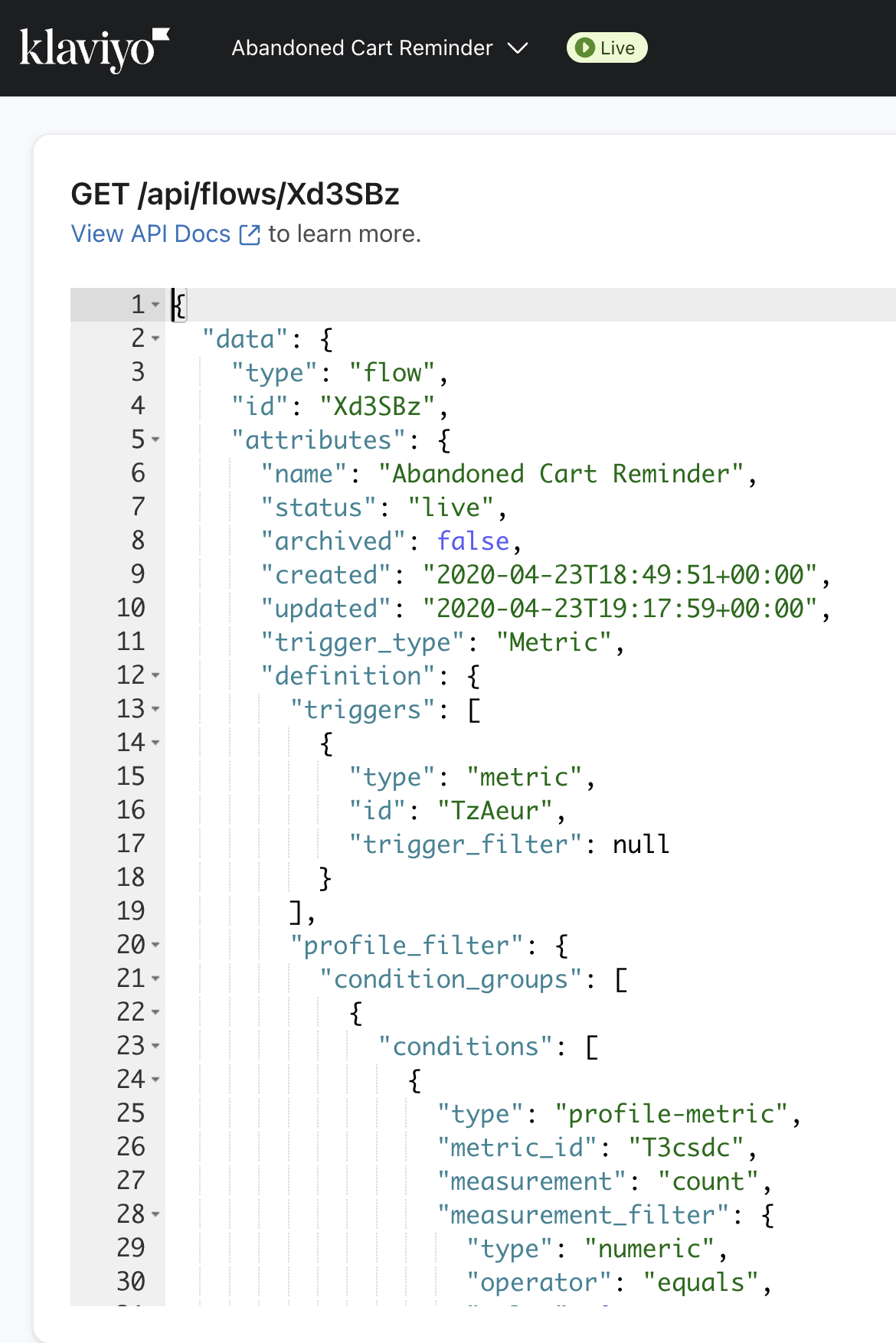
We’ve added a way for you to view and copy the JSON for your flows in the Klaviyo app.
1. Navigate to _[Flows](https://www.klaviyo.com/flows)_.
2. Click on a flow to edit it.
3. Delete `/edit` and append `.json` to the end of the URL.
The JSON should display for your flow as in the example below.
 ## Get Flow(s)
You can utilize Get Flow or Get Flows endpoints to pull in particular flow data, for example, flows in draft status. When making a Get Flow(s) request, here’s an example of how a _Welcome Series_ flow might look in the response:
```curl Request
curl --request GET \
--url https://a.klaviyo.com/api/flows/ \
--header 'Authorization: Klaviyo-API-Key your-private-api-key' \
--header 'accept: application/json' \
--header 'revision: 2024-02-15'
```
```json Response
{
"type": "flow",
"id": "RARMWY",
"attributes": {
"name": "Welcome Series",
"status": "draft",
"archived": false,
"created": "2023-07-19T17:43:52+00:00",
"updated": "2023-07-19T17:44:00+00:00",
"trigger_type": "Added to List"
},
"relationships": {
"flow-actions": {
"links": {
"self": "https://a.klaviyo.com/api/flows/RARMWY/relationships/flow-actions/",
"related": "https://a.klaviyo.com/api/flows/RARMWY/flow-actions/"
}
},
"tags": {
"links": {
"self": "https://a.klaviyo.com/api/flows/RARMWY/relationships/tags/",
"related": "https://a.klaviyo.com/api/flows/RARMWY/tags/"
}
}
},
"links": {
"self": "https://a.klaviyo.com/api/flows/RARMWY/"
}
}
```
> [!NOTE]
> It's important to keep your private API key a secret and never use it with our client endpoints. Not sure how to find your private API key? Locate your API credentials in Klaviyo.
## Get a flow's definition
`GET /api/flows/{id}/?additional-fields[flow]=definition`
We've added the ability to optionally retrieve a flow's `definition` alongside other attributes.
The example response below returns the definition of a metric-triggered flow with a time delay and a conditional split that will cause the profile to receive an email:
``` json Response
{
"data": {
"type": "flow",
"id": "VGEpVt",
"attributes": {
"name": "Metric-triggered Flow",
"status": "draft",
"archived": false,
"created": "2023-07-03T16:48:52+00:00",
"updated": "2023-07-03T16:52:43+00:00",
"trigger_type": "Metric",
"definition": {
"triggers": [
{
"type": "metric",
"id": "UpixsZ",
"trigger_filter": {
"condition_groups": [
{
"conditions": [
{
"type": "metric-property",
"metric_id": "UpixsZ",
"field": "$value",
"filter": {
"type": "numeric",
"operator": "greater-than",
"value": 5
}
}
]
}
]
}
}
],
"profile_filter": null,
"actions": [
{
"id": "56020948",
"temporary_id": null,
"type": "time-delay",
"links": {
"next": "56035815"
},
"data": {
"unit": "hours",
"value": 1,
"secondary_value": 0,
"timezone": "profile",
"delay_until_time": null,
"delay_until_weekdays": [
"monday",
"tuesday",
"wednesday"
]
}
},
{
"id": "56035815",
"temporary_id": null,
"type": "conditional-split",
"links": {
"next_if_true": "56035822",
"next_if_false": "56065784"
},
"data": {
"profile_filter": {
"condition_groups": [
{
"conditions": [
{
"type": "profile-marketing-consent",
"consent": {
"channel": "sms",
"can_receive_marketing": true,
"consent_status": {
"subscription": "subscribed",
"filters": null
}
}
}
]
}
]
}
}
},
{
"id": "56035822",
"temporary_id": null,
"type": "send-sms",
"links": {
"next": null
},
"data": {
"message": {
"body": "Hello world!",
"smart_sending_enabled": true,
"transactional": false,
"add_tracking_params": false,
"respecting_sms_quiet_hours": true,
"custom_tracking_params": null,
"additional_filters": null,
"name": "SMS #1",
"id": "W8pBcV"
},
"status": "draft"
}
},
{
"id": "56065784",
"temporary_id": null,
"type": "send-email",
"links": {
"next": null
},
"data": {
"message": {
"from_email": "sarah-mason@klaviyo-demo.com",
"from_label": "Sarah Mason",
"reply_to_email": null,
"cc_email": null,
"bcc_email": null,
"subject_line": "Email #1 Subject",
"preview_text": "",
"template_id": "RfgG9g",
"smart_sending_enabled": true,
"transactional": false,
"add_tracking_params": false,
"custom_tracking_params": null,
"additional_filters": null,
"name": "Email #1",
"id": "SxjMx3"
},
"status": "draft"
}
}
],
"entry_action_id": "56020948"
}
},
"relationships": {
"flow-actions": {
"links": {
"self": "https://a.klaviyo.com/api/flows/VGEpVt/relationships/flow-actions/",
"related": "https://a.klaviyo.com/api/flows/VGEpVt/flow-actions/"
}
},
"tags": {
"links": {
"self": "https://a.klaviyo.com/api/flows/VGEpVt/relationships/tags/",
"related": "https://a.klaviyo.com/api/flows/VGEpVt/tags/"
}
}
},
"links": {
"self": "https://a.klaviyo.com/api/flows/VGEpVt/"
}
},
"links": {
"self": "https://a.klaviyo.com/api/flows/VGEpVt/?additional-fields[flow]=definition"
}
}
```
## Get flows triggered by a metric
This endpoint can be used to retrieve the set of flows that are triggered by metrics created by your OAuth app.
`GET https://a.klaviyo.com/api/metrics/{metric_ID}/flow-triggers`
> [!NOTE]
> To understand the performance of your flows, use our [Reporting APIs for flows](https://developers.klaviyo.com/en/reference/reporting.md).
For example, if you'd like to retrieve all flows triggered by the `Shopify Placed Order` metric, which has an ID of `RcJaKy`, make a call to `GET /api/metrics/RcJaKy/flow-triggers`. Example response shown below:
``` json Response
{
"data": [
{
"type": "flow",
"id": "RzYr5H",
"attributes": {
"name": "Customer Thank You - New vs. Returning",
"status": "manual",
"archived": false,
"created": "2023-08-13T02:03:38+00:00",
"updated": "2023-08-13T02:03:39+00:00",
"trigger_type": "Metric"
},
"relationships": {
"flow-actions": {
"links": {
"self": "https://a.klaviyo.com/api/flows/RzYr5H/relationships/flow-actions/",
"related": "https://a.klaviyo.com/api/flows/RzYr5H/flow-actions/"
}
},
"tags": {
"links": {
"self": "https://a.klaviyo.com/api/flows/RzYr5H/relationships/tags/",
"related": "https://a.klaviyo.com/api/flows/RzYr5H/tags/"
}
}
},
"links": {
"self": "https://a.klaviyo.com/api/flows/RzYr5H/"
}
}
],
"links": {
"self": "https://a.klaviyo.com/api/metrics/RcJaKy/flow-triggers"
}
}
```
## Get IDs of flows triggered by a metric
This relationships endpoint returns the IDs of the flows that are triggered by a particular metric.
`GET /api/metrics/{metric_ID}/relationships/flow-triggers`
For example, if you'd to retrieve the IDs of all flows triggered by the `Shopify Placed Order` metric, which has an ID of `RcJaKy`, make a call to `GET /api/metrics/RcJaKy/relationships/flow-triggers`. Example response shown below.
``` json Response
{
"data": [
{
"type": "flow",
"id": "RzYr5H"
}
],
"links": {
"self": "https://a.klaviyo.com/api/metrics/RcJaKy/relationships/flow-triggers"
}
}
```
## Create a flow
Create a new flow using an encoded flow definition. `POST /api/flows/`
Below we have outlined the recommended workflow for creating a new flow via Flows API.
1. Create a flow with your desired settings in Klaviyo and copy its flow ID. This generates a flow definition we can utilize when creating flows programmatically.
2. Retrieve that flow and its definition with `GET /api/flows/:id?additional-fields[flow]=definition`
3. Modify the definition from the Get Flows request's response body. This allows us to quickly create a properly formatted request body with the definition we want our new flow to have.
1. Delete `relationships` and `links` from `data`.
2. Remove `created`, `updated`, `status`, `trigger_type` from `attributes`.
3. For each action in the `attributes.definition.actions` array, update the `temporary_id` field to reference the value of the `id` field.
4. Then, delete the `id` field.
> [!NOTE]
> When creating a new flow, actions are uniquely identified by a `temporary_id`. This identifier does not persist after saving. Once the flow is saved and returned via API, each action is returned with Klaviyo-generated IDs referenced in the `links` section of the response body.
4. Use the modified response body as the request body for your Create Flow call.
All flows are created in a `Draft` status by default, unless action status is otherwise set in your initial request.
A successful request will return the new definition to you.
> [!WARNING]
> Klaviyo does not recommend pre-creation of flows in customer accounts.
### Create a drag-and-drop flow template
If you're looking to create a flow that has a drag-and-drop template (e.g., for a "Send email" action) you can create HTML or hybrid templates via the [Create Template API](https://developers.klaviyo.com/en/reference/create_template.md).
To learn more about hybrid templates check out the guide to [creating a hybrid email template](https://help.klaviyo.com/hc/en-us/articles/115005254188).
> [!NOTE]
> We currently support **up to 2 drag-and-drop templates** per app partner. Please submit an example flow using [this form](https://docs.google.com/forms/d/e/1FAIpQLScSfSjvDCjoGQuwkgYVIHsfJIqo3xAF_rFWmrdmtURZ9zhySQ/viewform). Note that your submission is for the **Create Flow API.** Our team will reply with the `template_id`s needed to enable the following workflow.
Call [Clone Template API](https://developers.klaviyo.com/en/reference/clone_template.md) using the `template_id` provided by our team.
Call the Create Flow API using the ID of the template in the Clone Template API response as the `template_id` in a "`send-email`" action.
``` json Response
{
"data": {
"type": "flow",
"attributes": {
"name": "Metric-triggered Flow",
"definition": {
"triggers": [
{
"type": "metric",
"id": "UpixsZ",
"trigger_filter": {
"condition_groups": [
{
"conditions": [
{
"type": "metric-property",
"metric_id": "UpixsZ",
"field": "price",
"filter": {
"type": "numeric",
"operator": "greater-than",
"value": 5
}
}
]
}
]
}
}
],
"profile_filter": null,
"actions": [
{
"temporary_id": "56020948",
"type": "time-delay",
"links": {
"next": "56035815"
},
"data": {
"unit": "hours",
"value": 1,
"secondary_value": 0,
"timezone": "profile",
"delay_until_time": null,
"delay_until_weekdays": [
"monday",
"tuesday",
"wednesday"
]
}
},
{
"temporary_id": "56035815",
"type": "conditional-split",
"links": {
"next_if_true": "56035822",
"next_if_false": "56065784"
},
"data": {
"profile_filter": {
"condition_groups": [
{
"conditions": [
{
"type": "profile-marketing-consent",
"consent": {
"channel": "sms",
"can_receive_marketing": true,
"consent_status": {
"subscription": "subscribed",
"filters": null
}
}
}
]
}
]
}
}
},
{
"temporary_id": "56035822",
"type": "send-sms",
"links": {
"next": null
},
"data": {
"message": {
"body": "Hello world!",
"smart_sending_enabled": true,
"transactional": false,
"add_tracking_params": false,
"respecting_sms_quiet_hours": true,
"custom_tracking_params": null,
"additional_filters": null,
"name": "SMS #1",
"id": "W8pBcV"
},
"status": "draft"
}
},
{
"temporary_id": "56065784",
"type": "send-email",
"links": {
"next": null
},
"data": {
"message": {
"from_email": "sarah-mason@klaviyo-demo.com",
"from_label": "Sarah Mason",
"reply_to_email": null,
"cc_email": null,
"bcc_email": null,
"subject_line": "Email #1 Subject",
"preview_text": "",
"template_id": "RfgG9g",
"smart_sending_enabled": true,
"transactional": false,
"add_tracking_params": false,
"custom_tracking_params": null,
"additional_filters": null,
"name": "Email #1",
"id": "SxjMx3"
},
"status": "draft"
}
}
],
"entry_action_id": "56020948"
}
}
}
```
## Flow actions
A flow action’s data structure depends on the flow action type. For example, a _Send Email_ flow action will contain options for tracking, sending, and rendering the email. A _Time Delay_ flow action will contain settings including the delay’s length in seconds.
A flow action has the following:
- `id`
The flow action id.
- `attributes`
- `action_type`
The type of flow action (e.g., `"SEND_EMAIL"`).
- `status`
The status of the flow action (i.e., `"draft"`, `"manual"`, or `"live"`).
- `created`
The date that the flow action was created.
- `updated`
The date that the flow action was last updated.
- `settings`
Options needed for setting the flow action (e.g., `delay_seconds` for setting a time delay`)`.
A messaging flow action has the following:
- `tracking_options`
An object containing tracking option(s) shared by email and SMS messages:
- `is_add_utm`
Indicates if the email or SMS needs UTM parameters.
- `utm_params`
An array of objects representing the UTM parameters. If `is_add_utm` is `true` and the list is empty, company defaults will be used.
Email campaigns have the following additional tracking options:
- `is_tracking_clicks`
Whether the email is tracking click events (defaults to `true`).
- `is_tracking_opens`
Whether the email is tracking open events (defaults to `true`).
- `send_options`
An object containing tracking option(s) shared by email and SMS messages:
- `use_smart_sending` (default)
A boolean option to use smart sending for your email or SMS message (defaults to `true`). Smart sending skips recipients who have already received an email or SMS within a designated time frame.
- `render_options`
An object containing additional options for rendering the message:
- `shorten_links`
A boolean option that allows you to shorten links in the message.
- `add_org_prefix`
A boolean option that allows you to add an organizational prefix to the beginning of the message to identify your company as the sender.
- `add_info_link`
A boolean option that allows you to add a link to your custom company information page to the message.
- `add_opt_out_language`
A boolean option that allows you to include a phrase at the end of the message with SMS opt-out information.
A flow action has the following related resources:
- `flow`
The flow that contains the flow action.
- `flow-message`
The flow message which contains message content for the flow action, if applicable. For example, email content for a _Send Email_ flow action.
### Get flow actions for a flow
You may want to retrieve specific data from flow actions for a given flow, for example, the time delay set for an abandoned cart flow. To retrieve flow actions for a given flow, call the Get Flow Flow Actions endpoint with a flow ID.
Here’s an example of a _Send Email_ flow action retrieved from the _Welcome Series _ flow example:
```json
{
"type": "flow-action",
"id": "50516373",
"attributes": {
"action_type": "SEND_EMAIL",
"status": "draft",
"created": "2023-07-19T17:43:52+00:00",
"updated": "2023-07-19T17:43:53+00:00",
"settings": {},
"tracking_options": {
"add_utm": false,
"utm_params": [],
"is_tracking_opens": true,
"is_tracking_clicks": true
},
"send_options": {
"use_smart_sending": false,
"is_transactional": false
},
"render_options": null
},
"relationships": {
"flow": {
"links": {
"self": "https://a.klaviyo.com/api/flow-actions/50516373/relationships/flow/",
"related": "https://a.klaviyo.com/api/flow-actions/50516373/flow/"
}
},
"flow-messages": {
"links": {
"self": "https://a.klaviyo.com/api/flow-actions/50516373/relationships/flow-messages/",
"related": "https://a.klaviyo.com/api/flow-actions/50516373/flow-messages/"
}
}
},
"links": {
"self": "https://a.klaviyo.com/api/flow-actions/50516373/"
}
},
```
### Complete a flow A/B test
Use Update Flow Action to complete a live email or SMS A/B test and apply the winning variation's content to the main message. The action's definition has `type: "ab-test"`. Its `experiment_status` is `"live"` while the test is running and `"completed"` after it ends.
Use API revision `2025-10-15` or later. The existing `2025-04-15.pre` beta revision also uses this completion behavior. The example below uses `2026-10-15`.
1. Retrieve the action with Get Flow Action. Copy `data.attributes.definition` from the response. **Optional:** To select a specific winner, copy its action ID from `data.attributes.definition.data.current_experiment.variations[].id` before clearing `current_experiment`.
2. Set `data.attributes.definition.data.experiment_status` to `"completed"` and `data.attributes.definition.data.current_experiment` to `null`. Remove `winning_variation_id` and `concluded_experiment_id` from `data.attributes.definition.data`; the server sets these fields. Keep the rest of the retrieved definition, including `main_action` and `links`.
3. Send the updated definition in a `PATCH` request. **Optional:** Set `data.relationships.winning-variation.data.id` to your selected variation's action ID. Place `relationships` alongside `attributes`, as shown below. Omit the relationship to let the API select a winner.
This example completes A/B test action `56065780` with variation `56065784`. It includes a shortened email definition. Replace the sample IDs and definition with those from your account.
```curl Request
curl --request PATCH \
--url 'https://a.klaviyo.com/api/flow-actions/56065780/' \
--header 'Authorization: Klaviyo-API-Key your-private-api-key' \
--header 'accept: application/vnd.api+json' \
--header 'content-type: application/vnd.api+json' \
--header 'revision: 2026-10-15' \
--data '{
"data": {
"type": "flow-action",
"id": "56065780",
"attributes": {
"definition": {
"id": "56065780",
"type": "ab-test",
"links": {
"next": null
},
"data": {
"status": "live",
"experiment_status": "completed",
"current_experiment": null,
"main_action": {
"id": "50516373",
"type": "send-email",
"links": {
"next": null
},
"data": {
"status": "live",
"message": {
"from_email": "sarah-mason@klaviyo-demo.com",
"from_label": "Sarah Mason",
"subject_line": "Welcome to our store!",
"preview_text": "Thanks for signing up.",
"template_id": "RfgG9g",
"smart_sending_enabled": true,
"transactional": false,
"add_tracking_params": false,
"name": "Welcome Series, Email #1",
"id": "SxjMx3"
}
}
}
}
}
},
"relationships": {
"winning-variation": {
"data": {
"type": "flow-action",
"id": "56065784"
}
}
}
}
}'
```
When you complete a test:
- **Selected content:** The API copies the winning variation's content onto the main message for subsequent sends. The main message keeps its ID.
- **Automatic selection:** If you omit `data.relationships.winning-variation` or set its `data` to `null`, the API selects the variation with the highest success rate for the test's configured winning metric. For example, click rate measures unique recipients who clicked divided by delivered messages. You choose the metric in the test's **Winner Selection** settings; see How to A/B test a flow email. Ties, including tests with no results, select the first-created variation. Completing a test through this request does not require statistical significance.
- **Invalid winner:** If the winner isn't part of the current test, including a winner from an earlier test, the API returns `400` with a pointer to `/data/relationships/winning-variation/data/id`.
- **Retries:** You can repeat a completion request with the same recorded winner, with the relationship omitted, or with its `data` set to `null`. These retries preserve the current main-message content. If you supply a different winner for an already completed test, the API returns `400` with the same field pointer.
- **State conflicts:** If the test's state changes before the API can complete it, the API can return `409` with a pointer to `/data/attributes/definition/data/experiment_status`. Retrieve the action again before deciding whether to retry.
- **Later edits:** To edit the message after completion, update the main email or SMS action directly. Use the ID and definition returned in `data.attributes.definition.data.main_action`, and omit the `winning-variation` relationship from this update.
### Get messages for a flow action
You can retrieve flow action messages to access message data such as a message’s sending address, or when a flow message was last updated. In addition to fetching message content and activity, you can retrieve the flow action and/or email template associated with the message.
You can fetch a flow message given a flow action ID using the Get Flow Action Messages endpoint. Here’s an example of what a _Send Email_ message from the _Welcome Series_ flow would look like:
```curl Request
curl --request GET \
--url 'https://a.klaviyo.com/api/flow-actions/50516373/flow-messages/
--header 'Authorization: Klaviyo-API-Key your-private-api-key' \
--header 'accept: application/json' \
--header 'revision: 2024-02-15'
```
```json Response
{
"data": [
{
"type": "flow-message",
"id": "TphFtt",
"attributes": {
"name": "Welcome Series, Email #1",
"channel": "Email",
"content": {
"subject": "Thanks for signing up!",
"preview_text": "Welcome!",
"from_email": "sarah.mason@klaviyo-test.com",
"from_label": "Sarah Mason",
...
},
"created": "2023-07-19T17:43:52+00:00",
"updated": "2023-07-19T17:43:52+00:00"
},
"relationships": {
"flow-action": {
"links": {
"self": "https://a.klaviyo.com/api/flow-messages/TphFtt/relationships/flow-action/",
"related": "https://a.klaviyo.com/api/flow-messages/TphFtt/flow-action/"
}
},
"template": {
"data": {
"type": "template",
"id": "VbHyXW"
},
"links": {
"self": "https://a.klaviyo.com/api/flow-messages/TphFtt/relationships/template/",
"related": "https://a.klaviyo.com/api/flow-messages/TphFtt/template/"
}
}
},
"links": {
"self": "https://a.klaviyo.com/api/flow-messages/TphFtt/"
}
}
],
"links": {
"self": "https://a.klaviyo.com/api/flow-actions/50516373/flow-messages/",
...
}
}
```
### Get template for flow message
The _Relationships_ endpoints that exist within the Flows API are useful for retrieving resources connected to flow-related objects (such as a flow message associated with a flow action).
Get Flow Message Template allows you to fetch an HTML template associated with a flow action’s message. For example, you might want to use the template ID from a Get Flow Message Template response to programmatically update the template used by the flow message (i.e., Update Template).
You can fetch a flow message’s template using the flow message ID related to a specific flow action, for example, _Send Email_. When making a Get Flow Message Template request, here’s an example of how the response could look for a _Welcome Series_ flow:
```curl Request
curl --request GET \
--url https://a.klaviyo.com/api/flow-messages/TphFtt/template/ \
--header 'Authorization: Klaviyo-API-Key your-private-api-key' \
--header 'accept: application/json' \
--header 'revision: 2024-02-15'
```
```json Response
{
"data": {
"type": "template",
"id": "VbHyXW",
"attributes": {
"name": "[automation] [Trimmed] Newsletter #1 (Images & Text)",
"editor_type": "SYSTEM_DRAGGABLE",
"html": "\n\n\n\n\n\n\n\n\n",
"text": null,
"created": "2023-07-19T17:43:52+00:00",
"updated": "2023-07-19T17:43:54+00:00"
},
"links": {
"self": "https://a.klaviyo.com/api/templates/VbHyXW/"
}
}
}
```
## Querying flows
Querying flows with the Get Flows endpoint can help you achieve things like retrieving a list of flows in draft status. Check out the supported query parameters below and test them out with our latest Postman collection. Note that support for given operators and fields is endpoint-specific. Review the [API reference documentation](https://developers.klaviyo.com/en/reference/get_events.md) for more information on allowed fields and query operators.
| Parameter | Description | Query example |
| --- | --- | --- |
| `filter` | Retrieve a subset of flows, e.g., flows that trigger when a profile is added to a list. Learn about the filter query parameter. | `GET /api/flows?filter=and(equals(trigger_type,"Added to List")` |
| `sort` | Sort flows, e.g., by updated `datetime` in ascending order (oldest to newest). Learn about the sort query parameter. | `GET /api/flows?sort=-updated` |
| `fields` | Request for only specified flow data (e.g., only return the status field for each flow action in the response). You can also request for only specified related resource data. Learn more about sparse fieldsets. | `GET /api/flows?include=flow-action&fields[flow-action]=status` |
| `include` | Include related resources in the response, e.g., flow actions. Learn about the include query parameter. | `GET /api/flows?include=flow-actions` |
## Next steps
Using your Klaviyo test account and Postman, try out the following:
1. Create an abandoned cart flow in your Klaviyo test account and copy the flow ID.
2. Fetch the flow actions associated with your flow using the flow ID in a call to Get Flow Flow Actions. Use `?filter=equals(action_type,"SEND_EMAIL")` as a query parameter to show only _Send Email_ flow actions.
3. Call Get Flow Action Messages with a flow action ID from your response to get the _Send Email_ action’s message.
4. Call Get Flow Message Template with the flow message ID from your response.
5. Update the template with Update Template, using the template ID from your response.
## Additional resources
- Getting started with flows
- How to create an abandoned cart flow
- Understanding flow triggers and filters
## Endpoints
- [Get Flows](https://developers.klaviyo.com/en/v2025-01-15/reference/get_flows.md): `GET /api/flows`
- [Get Flow](https://developers.klaviyo.com/en/v2025-01-15/reference/get_flow.md): `GET /api/flows/{id}`
- [Create Flow](https://developers.klaviyo.com/en/v2025-01-15/reference/create_flow.md): `POST /api/flows`
- [Update Flow Status](https://developers.klaviyo.com/en/v2025-01-15/reference/update_flow.md): `PATCH /api/flows/{id}`
- [Delete Flow](https://developers.klaviyo.com/en/v2025-01-15/reference/delete_flow.md): `DELETE /api/flows/{id}`
- [Get Flow Action](https://developers.klaviyo.com/en/v2025-01-15/reference/get_flow_action.md): `GET /api/flow-actions/{id}`
- [Get Flow Message](https://developers.klaviyo.com/en/v2025-01-15/reference/get_flow_message.md): `GET /api/flow-messages/{id}`
- [Get Actions for Flow](https://developers.klaviyo.com/en/v2025-01-15/reference/get_actions_for_flow.md): `GET /api/flows/{id}/flow-actions`
- [Get Action IDs for Flow](https://developers.klaviyo.com/en/v2025-01-15/reference/get_action_ids_for_flow.md): `GET /api/flows/{id}/relationships/flow-actions`
- [Get Tags for Flow](https://developers.klaviyo.com/en/v2025-01-15/reference/get_tags_for_flow.md): `GET /api/flows/{id}/tags`
- [Get Tag IDs for Flow](https://developers.klaviyo.com/en/v2025-01-15/reference/get_tag_ids_for_flow.md): `GET /api/flows/{id}/relationships/tags`
- [Get Flow for Flow Action](https://developers.klaviyo.com/en/v2025-01-15/reference/get_flow_for_flow_action.md): `GET /api/flow-actions/{id}/flow`
- [Get Flow ID for Flow Action](https://developers.klaviyo.com/en/v2025-01-15/reference/get_flow_id_for_flow_action.md): `GET /api/flow-actions/{id}/relationships/flow`
- [Get Messages For Flow Action](https://developers.klaviyo.com/en/v2025-01-15/reference/get_flow_action_messages.md): `GET /api/flow-actions/{id}/flow-messages`
- [Get Message IDs for Flow Action](https://developers.klaviyo.com/en/v2025-01-15/reference/get_message_ids_for_flow_action.md): `GET /api/flow-actions/{id}/relationships/flow-messages`
- [Get Action for Flow Message](https://developers.klaviyo.com/en/v2025-01-15/reference/get_action_for_flow_message.md): `GET /api/flow-messages/{id}/flow-action`
- [Get Action ID for Flow Message](https://developers.klaviyo.com/en/v2025-01-15/reference/get_action_id_for_flow_message.md): `GET /api/flow-messages/{id}/relationships/flow-action`
- [Get Template for Flow Message](https://developers.klaviyo.com/en/v2025-01-15/reference/get_template_for_flow_message.md): `GET /api/flow-messages/{id}/template`
- [Get Template ID for Flow Message](https://developers.klaviyo.com/en/v2025-01-15/reference/get_template_id_for_flow_message.md): `GET /api/flow-messages/{id}/relationships/template`