---
title: "Manage coupons with the Coupons API"
description: "Learn how to automate coupon code uploads."
url: "https://developers.klaviyo.com/en/docs/use_klaviyos_coupons_api"
category: "Build with Klaviyo"
lastUpdated: "2026-11-06"
related: ["https://developers.klaviyo.com/en/docs/llms.txt"]
---
# Manage coupons with the Coupons API
> This is the Markdown version of https://developers.klaviyo.com/en/docs/use_klaviyos_coupons_api
Learn how to automate coupon code uploads.
Klaviyo's Coupons API allows you to create and manage coupons and coupon codes. After you follow this guide, you should be able to create your first coupon code, upload coupon codes, and check for coupon code availability via API.
> [!WARNING]
> The Coupons API does not support Shopify coupon creation, or access to Shopify coupons created via Klaviyo’s UI. Access to other uploaded coupons via Klaviyo’s UI is supported.
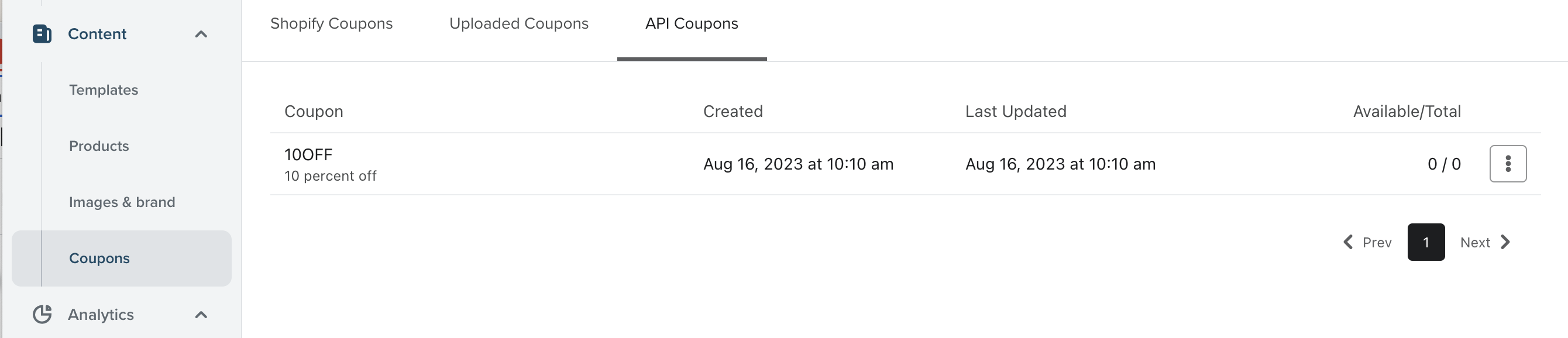
In the Klaviyo application, you can view coupons under **Content > Coupons**. On this page, you can navigate to the API Coupons tab to view coupons added via API.
 ## Data model
A coupon can be linked to a number of unique coupon codes. A coupon code gets its value from a single coupon, which can also be applied to other coupon codes. For example, a coupon containing a description for 50% off can be assigned to a limitless number of coupon codes. Each code uses the `relationships` object which associates it to a defined coupon and profile. For more information on relationships, refer to our JSON:API relationships guide.
A coupon has the following:
- `external_id`
The unique coupon ID in an external point-of-sale (POS) system where you generate the coupon.
- `description`
An coupon description (optional).
A coupon code has the following:
- `unique_code`
The code that can be used by a shopper to apply a discount to their purchase.
- `expires_at`
A code expiration datetime, when it may no longer be used to claim the discount (optional).
- `status`
The current coupon code status, one of `ASSIGNED_TO_PROFILE`,`DELETING`,`PROCESSING`,`UNASSIGNED`,`VERSION_NOT_ACTIVE`
- `relationships`
- `coupon`
The coupon with which the code is associated.
- `profile`
The Klaviyo profile the code has been assigned to, set when a profile is sent the coupon code in a campaign or flow message.
> [!WARNING]
> Note that a coupon may have many coupon codes attached to it, but a coupon code may be associated with only one coupon.
## Common use cases
```prompt Upload coupon codes to Klaviyo
Add code to this project that creates a coupon in Klaviyo, uploads unique coupon codes for it, and checks how many unassigned codes are left.
First read https://developers.klaviyo.com/en/docs/use_klaviyos_coupons_api.md.
Ask me for these before you change anything, unless I've already given them:
- A Klaviyo private API key. Read it from an environment variable, and keep it out of source control and logs.
- The coupon's `external_id` (its ID in the point-of-sale system that generates the codes) and, optionally, a description.
- Where the codes come from, and when they expire.
- Whether someone already uploaded this coupon in Klaviyo's UI. If so, each code's `expires_at` must match the coupon's expiration date there, or be left out if it has none.
Then, following this codebase's language, framework and conventions:
1. Send requests with `Authorization: Klaviyo-API-Key `, `accept: application/json`, `content-type: application/json` and the `revision` header the guide's examples use.
2. Unless the coupon already exists, create it with `POST https://a.klaviyo.com/api/coupons/`: `data.type` is `coupon`, with `external_id` and `description` in `attributes`.
3. Upload codes with `POST https://a.klaviyo.com/api/coupon-code-bulk-create-jobs/`: `data.type` is `coupon-code-bulk-create-job`, and `attributes.coupon-codes.data` lists `coupon-code` items, each with `unique_code`, an optional `expires_at`, and `relationships.coupon` pointing at the coupon's `external_id`.
4. Check availability with `GET https://a.klaviyo.com/api/coupon-codes` and a filter such as `and(equals(coupon.id,""),equals(status,"UNASSIGNED"),greater-or-equal(expires_at,))`.
5. Report a `409` as an expiration mismatch with a coupon created in the UI.
Don't use this for Shopify coupons, which the Coupons API doesn't support. Don't change a UI-uploaded coupon's expiration date or add codes to messages; both are done in Klaviyo. Klaviyo doesn't track redemptions, so don't look for them there.
When you're done, check the codes in Klaviyo under Content > Coupons > API Coupons, or with the availability check. Tell me what you changed.
```
### Create a coupon and upload codes
Follow the examples below to get started creating coupons and uploading coupon codes for your email and SMS messages.
#### Example API call to create a coupon
Here is an example on how to create a coupon using the Create Coupon endpoint:
```curl
curl --request POST \
--url https://a.klaviyo.com/api/coupons/ \
--header 'Authorization: Klaviyo-API-Key your-private-api-key' \
--header 'accept: application/json' \
--header 'content-type: application/json' \
--header 'revision: 2026-10-15' \
--data '
{
"data": {
"type": "coupon",
"attributes": {
"external_id": "10OFF",
"description": "10% off for purchases over $50"
}
}
}
'
```
#### Example API call to upload coupon codes
After a coupon is created, we can make a call to the Spawn Coupon Code Bulk Create Job endpoint to upload coupon codes as shown in the example below:
```curl
curl --request POST \
--url https://a.klaviyo.com/api/coupon-code-bulk-create-jobs/ \
--header 'Authorization: Klaviyo-API-Key your-private-api-key' \
--header 'accept: application/json' \
--header 'content-type: application/json' \
--header 'revision: 2026-10-15' \
--data '
{
"data": {
"type": "coupon-code-bulk-create-job",
"attributes": {
"coupon-codes": {
"data": [
{
"type": "coupon-code",
"attributes": {
"unique_code": "ASD325FHK324UJDOI2M3JNES99",
"expires_at": "2024-04-20T00:00:00Z"
},
"relationships": {
"coupon": {
"data": {
"type": "coupon",
"id": "10OFF"
}
}
}
},
{
"type": "coupon-code",
"attributes": {
"unique_code": "AFD35FHK324UJDOI2M3JNES10",
"expires_at": "2024-04-20T00:00:00Z"
},
"relationships": {
"coupon": {
"data": {
"type": "coupon",
"id": "10OFF"
}
}
}
},
...
]
}
}
}
'
```
> [!NOTE]
> A maximum of 500 coupons can be active in an account at once. There is currently no limit on the amount of coupon codes an account can create.
### Check for coupon code availability
You can filter coupon codes by coupon ID, status, and expiration date to monitor coupon usage and determine whether to create additional coupons.
> [!WARNING]
> We do not track whether a coupon code has been redeemed within Klaviyo. This data should reside in your external system.
#### Example request and response
In the following example, we make a request to filter unassigned coupon codes with the id `10OFF` that expire at 12:00 AM on April 20, 2024 or later:
```curl Request
curl --request GET \
--url 'https://a.klaviyo.com/api/coupon-codes?filter=and(equals(coupon.id,"10OFF"),equals(status,"UNASSIGNED"),greater-or-equal(expires_at,2024-04-20T00:00:00Z))' \
--header 'Authorization: Klaviyo-API-Key your-private-api-key' \
--header 'accept: application/json' \
--header 'revision: 2026-10-15'
```
```json Response
{
"data": [
{
"type": "coupon-code",
"id": "10OFF-ASD325FHK324UJDOI2M3JNES99",
"attributes": {
"unique_code": "ASD325FHK324UJDOI2M3JNES99",
"expiration": "2024-07-17T18:26:59+00:00",
"status": "UNASSIGNED"
},
"relationships": {
"coupon": {
"data": {
"type": "coupon",
"id": "10OFF"
},
"links": {
"self": "https://a.klaviyo.com/api/coupon-codes/10OFF-ASD325FHK324UJDOI2M3JNES99/relationships/coupon/",
"related": "https://a.klaviyo.com/api/coupon-codes/10OFF-ASD325FHK324UJDOI2M3JNES99/coupon/"
}
},
"profile": {
"data": {
"type": "profile",
"id": "ABC123050345034"
},
"links": {
"self": "https://a.klaviyo.com/api/coupon-codes/10OFF-ASD325FHK324UJDOI2M3JNES99/relationships/profile/",
"related": "https://a.klaviyo.com/api/coupon-codes/10OFF-ASD325FHK324UJDOI2M3JNES99/profile/"
}
}
},
"links": {
"self": "https://a.klaviyo.com/api/coupon-codes/10OFF-ASD325FHK324UJDOI2M3JNES99/"
}
},
...
]
}
```
### Use coupon codes in messages
Refer to our guide on how to use unique coupon codes in SMS and MMS messages to learn how. Use the `external_id` of your coupon as the “CouponName."
## Common error cases
Coupons created via API look different from coupons manually uploaded via Klaviyo’s UI. A manually uploaded coupon may have an expiration date, while an API coupon is related to a coupon code which may have an expiration date. If you want to modify an expiration date of a manually uploaded coupon via API, you must do this via UI. You may create coupon codes for a manually uploaded coupon, but their expiration dates must match the expiration date set in the UI.
Because our Coupons API allows you to create coupon codes for existing, manually uploaded coupons, we have special error handling to prevent expiration-related conflicts.
A 409 conflict error is returned if a coupon that was created via UI:
- has a set expiration date, but its related coupon codes do not have a set expiration date.
- has a set expiration date, but its related coupon codes' expiration dates do not match.
- does not have a set expiration date, but its related coupon codes have a set expiration date.
To avoid errors, update expiration dates for parent coupons in the UI and/or update `expires_at` fields for related coupon codes via API as needed.
## Additional resources
- Getting started with coupon codes in Klaviyo
- How to use unique coupon codes in SMS and MMS messages
- JSON:API relationships
- JSON:API filtering