---
title: "Branding for app metrics"
description: "Learn how to set up and use branding for your app metrics."
url: "https://developers.klaviyo.com/en/docs/understanding_branded_events"
category: "Partner resources"
lastUpdated: "2026-11-09"
related: ["https://developers.klaviyo.com/en/docs/llms.txt"]
---
# Branding for app metrics
> This is the Markdown version of https://developers.klaviyo.com/en/docs/understanding_branded_events
Learn how to set up and use branding for your app metrics.
App metric branding is available to all apps using OAuth.
## What are app metrics?
Metrics are essentially an event category, while events are individual, time-stamped instances of a metric. App metrics are metrics that Klaviyo can identify as being created by your app - that is, metrics created via OAuth.
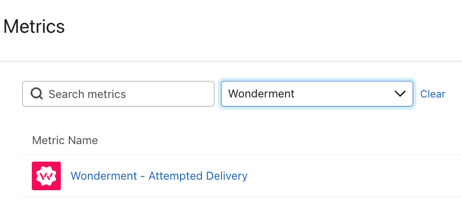
App metrics become branded when they have an application icon (branding) associated with them. They can be filtered in the _Metrics_ tab by integration name:
 > [!NOTE]
> Unbranded app metrics are metrics that are identified as coming from your app but lack an associated icon. These will appear with a cog icon until an icon is uploaded.
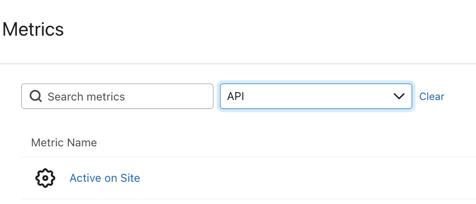
App metrics are different from API metrics. API metrics are not able to be identified as coming from your app and have a cog icon associated with them. API metrics can be filtered by selecting _API_ in the _Metrics_ tab:
 ## Brand your app metrics with an AI agent
```prompt Make this app's Klaviyo metrics branded
Change how this app sends events to Klaviyo so its metrics become branded app metrics, without creating divergent metrics.
First read https://developers.klaviyo.com/en/docs/understanding_branded_events.md.
Ask me for these before you change anything, unless I've already given them:
- The app's integration name in Klaviyo, for checking the result.
- Whether the app should send test events when an account installs it, and what they should contain.
Then, following this app's language, framework and conventions:
1. Check that the app connects to Klaviyo with OAuth. If it doesn't, stop and point me to https://developers.klaviyo.com/en/docs/set_up_oauth, since only OAuth events can be branded.
2. Find every place the app sends events to Klaviyo and list which use the account's OAuth access token on the server, a private API key, or the public API key in the browser (for example `/client/events/`). Only the first can be branded.
3. Before changing anything, show me any metric name sent by more than one method. The same name sent through a branded and an API method creates divergent metrics, which break flows, segments and reports.
4. Move the events I approve to the server: proxy browser events through the app's server and send them to `/api/events` with the account's access token.
5. Keep every metric name exactly as it is, and never move a metric from branded back to an API method; both create divergent metrics.
6. If I asked for test events, send them after a successful install so the app's metrics are available for flows and reporting.
Don't upload an icon or submit the app for review; that's done through Klaviyo's app review. Keep tokens and keys out of source control and logs.
To check it worked, call `GET https://a.klaviyo.com/api/metrics/` with `filter=equals(integration.name,"")` and `fields[metric]=name,integration`, using `Authorization: Bearer ` and a `revision` header, and confirm the app's metrics are listed (they show a cog icon until the icon is uploaded). Then tell me what you changed.
```
## Set up branding
In order for your app’s metrics to be branded, you must:
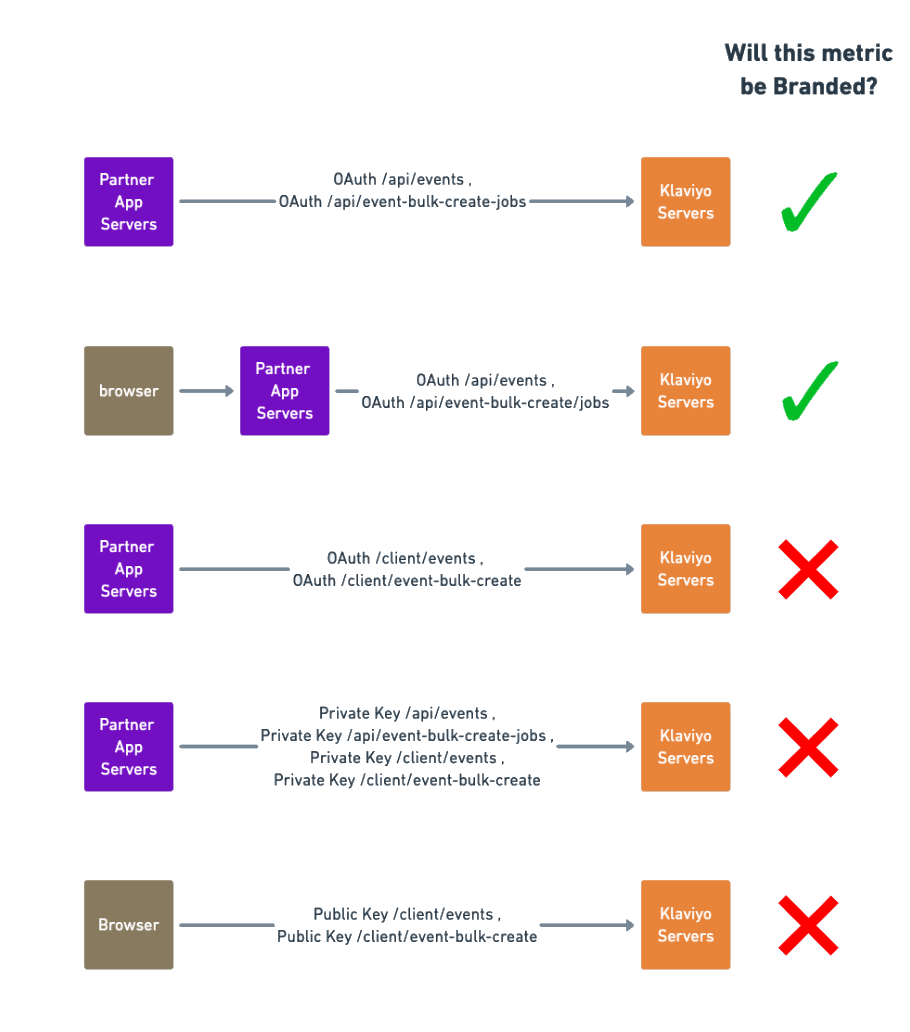
1. Send server-side events via OAuth and proxying any client-side events through your server and sending them via OAuth. Server-side OAuth events can be branded because we can authenticate who you are.
- Events sent via private key and events sent via client-side APIs that make use of the Public API Key / Site ID (e.g., `/client/events/`) cannot be branded. Client-side events cannot be branded because there is no authentication mechanism to confirm the event is coming from your app. These are considered API metrics and will appear with a cog icon in Klaviyo.
- If you send events via branded app metric and API metric methods, you’ll want to keep them separate to avoid divergent metrics (see _Important: Avoid divergent metrics_ below for more information). Specifically, you should not be sending the same event via a branded app metric and API metric method.
2. Follow the steps to [submit your app for review](https://developers.klaviyo.com/en/docs/submit_your_app_for_review.md). Before your icon is uploaded, any events meeting the branded event criteria will show up with the cog icon:
 Here’s a diagram showing which events will be branded:
 ## Migrating historical metrics
Going forward, metrics that meet the criteria in the diagram above will be branded automatically.
If your pre-existing app has historical API metrics, we will automatically migrate them to branded app metrics (on a per-metric basis) when a Klaviyo user installs your OAuth app via the following process:
- When an event meeting the branding criteria enters our system, we will check to see if there’s an API metric with the same name.
- We will check over 24 hours to see if that event is only sent via OAuth. If the same event is sent via API key and OAuth during this period, we will not brand the metric.
- We will also check to ensure there are no multiple apps sending the same metric name for the same customer. If this is the case, we won’t be able to brand the metric (though this is not expected to happen frequently).
If the above conditions are met, we will brand the event.
## Send test events for your branded app metrics
A branded app metric will not appear in an account using your app until the first metric has been associated with a created event. When a user installs your OAuth app, it's best practice to send test events upfront to ensure your app metrics are available in Klaviyo for creating flows, reporting, and more.
## Important: Avoid divergent metrics
It is important to avoid divergent metrics. Divergent metrics are two or more distinct metrics with unique metric IDs that share the same name, but come from different sources.
Divergent metrics most commonly occur when an event with the same name is sent via a “branded app metric” method and an “API metric” method. This results in two separate metrics in Klaviyo (with two different icons) which then cannot be utilized together in Klaviyo. You should avoid divergent metrics because they can break flows, segments, and reports associated with the metric.
For example, say that you start sending a new metric (named _Added to Cart_) via both `/api/events` with OAuth, and `/client/events` with a public key. This would result in a divergent metric and you would see two different metric types in your account. Those sent via OAuth would appear with your icon, and those send via public key would appear with a cog:
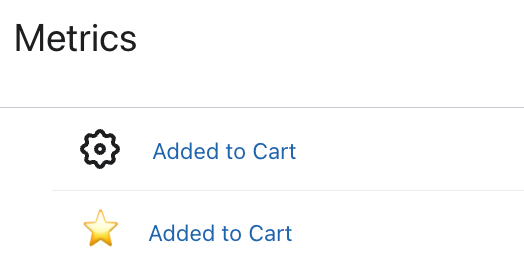 Any flows, segments, reports, etc., that you build with one of these metrics (branded or API) would only reflect some of your _Added to Cart_ data, since the metric has diverged.
To avoid divergent metrics:
- Avoid sending the same metric name via a branded and API method. If you’d like to send both branded and API events, you should keep them separate and know that API metrics will appear with a cog icon. Our automatic process for migrating historical metrics should help you avoid divergent metrics.
- Avoid changing the name of a metric. For instance, you have an app called “Apptastic”. You name a metric _Apptastic Shipment Delivered_, but later change the name to _Shipment Delivered_. These metrics would diverge.
> [!WARNING]
> While our system will handle the move from an API metric to a branded app metric, you cannot move from a branded app metric to an API metric - this will result in a divergent metric.
## Fetch branded app metrics
Now that you’ve created metrics for your app, you can query for these metrics using the Metrics API. Make a request to [Get Metrics](https://developers.klaviyo.com/en/reference/get_metrics.md) with a filter to fetch app metrics specific to your integration. In the example below, the filter uses the integration name, but you can also fetch metrics by integration category.
```curl Request
curl --request GET \
--url 'https://a.klaviyo.com/api/metrics/?filter=equals(integration.name,"YourIntegration")&fields%5Bmetric%5D=name,integration' \
--header 'Authorization: Bearer {access_token}' \
--header 'accept: application/json' \
--header 'revision: 2024-10-15'
```
```json Response
{
"data": [
{
"type": "metric",
"id": "REcTBe",
"attributes": {
"name": "YourIntegration: Sent SMS",
"integration": {
"id": "0rG4eQ",
"name": "YourIntegration"
}
},
"links": {
"self": "https://a.klaviyo.com/api/metrics/REcTBe/"
}
},
{
"type": "metric",
"id": "RcsmFp",
"attributes": {
"name": "YourIntegration: Marked Email as Spam",
"integration": {
"id": "0rG4eQ",
"name": "YourIntegration"
}
},
"links": {
"self": "https://a.klaviyo.com/api/metrics/RcsmFp/"
}
},
...
}
```
> [!NOTE]
> Learn how to [fetch performance data for flows triggered by your app metrics](https://developers.klaviyo.com/en/docs/get_performance_data_for_flows_triggered_by_your_app_metrics.md).
## Additional resources
- Make API calls using OAuth
- Create help docs for your integration